Dapr Workflow with Quarkus tutorial
In this tutorial you'll:
- Create a Dapr Workflow Quarkus application from scratch
- Run the application locally using Quarkus Dev Services
- Run the application locally and use the managed workflow engine provided by Catalyst
- Use the Catalyst workflow visualizer to monitor workflow executions
1. Prerequisites
- JDK 21+ (Download)
- Maven 3.x or Gradle 6.x
2. Create a Quarkus project
If you don't already have a Quarkus application, create one by visiting https://code.quarkus.io.
In the dependencies selector, select REST (or REST Jackson if you need JSON support) and click Generate your application.
This will download a Zip file that you need to unzip to start coding your Quarkus application.
3. Add the Quarkus Dapr extension
Open the pom.xml (or build.gradle) file and add the Quarkus Dapr extension dependency. To find the latest version check this link to Maven Central.
Maven
Add the following dependency to your pom.xml:
<dependency>
    <groupId>io.quarkiverse.dapr</groupId>
    <artifactId>quarkus-dapr</artifactId>
    <version>2.5.0-rc.2</version>
</dependency>
Gradle
Add the following dependency to your build.gradle:
dependencies {
    implementation 'io.quarkiverse.dapr:quarkus-dapr:2.5.0-rc.2'
}
4. Enable Dapr Workflows
To enable Dapr Workflows in your Quarkus application, add the following property to your application.properties file:
quarkus.dapr.workflow.enabled=true
When the application starts, the Quarkus Dapr extension automatically scans the classpath to discover Workflow and WorkflowActivity implementations and registers them with the workflow runtime.
5. Project structure
After completing the following sections, your project will have this structure:
src/main/java/io/diagrid/workflows/
├── SimpleWorkflow.java
├── WorkflowsResource.java
├── activities/
│   └── FirstActivity.java
└── services/
    └── CounterService.java
src/main/resources/
└── application.properties
Open with your favorite IDE and let's create your first workflow.
6. Create your first workflow
To create a workflow, create a class that implements the Workflow interface. In Quarkus, use the CDI @ApplicationScoped annotation to make the workflow a managed bean.
package io.diagrid.workflows;

import jakarta.enterprise.context.ApplicationScoped;

import io.dapr.workflows.Workflow;
import io.dapr.workflows.WorkflowStub;
import io.diagrid.workflows.activities.FirstActivity;

@ApplicationScoped
public class SimpleWorkflow implements Workflow {

    @Override
    public WorkflowStub create() {
        return ctx -> {
            String instanceId = ctx.getInstanceId();

            ctx.getLogger().info("Starting SimpleWorkflow instance: {}", instanceId);

            ctx.callActivity(FirstActivity.class.getName()).await();

            ctx.complete("Workflow completed");
        };
    }
}
You can have as many workflows as you want inside your Quarkus projects.
Notice: Use the CDI @ApplicationScoped annotation to make sure that the workflow definition is a managed bean.
Once you have your workflow class, the next step is to implement your workflow logic. This can include:
- Calling activities: by using the
ctx.callActivity(...)method we can build durable integrations with other systems. - Waiting for external events: by using the
ctx.waitForExternalEvent(...)method the workflow will wait for events coming from outside your application. - Creating timers: the application can schedule timers to resume the workflow execution at a specific point in time in the future.
- Making logical choices: using Java constructs (if/switch statements) you can define multiple workflow branches and their behavior.
- Calling Child Workflows: compose complex scenarios by creating parent/child relationships across workflow definitions.
7. Create a workflow activity
Workflow activities give you the perfect place to call other services to build complex workflow orchestrations.
Let's create the FirstActivity that our workflow calls. Activities can inject other CDI beans, such as a CounterService:
package io.diagrid.workflows.activities;

import jakarta.enterprise.context.ApplicationScoped;
import jakarta.inject.Inject;

import io.dapr.workflows.WorkflowActivity;
import io.dapr.workflows.WorkflowActivityContext;
import io.diagrid.workflows.services.CounterService;
import io.quarkus.logging.Log;

@ApplicationScoped
public class FirstActivity implements WorkflowActivity {

    @Inject
    CounterService counterService;

    @Override
    public Object run(WorkflowActivityContext ctx) {
        Log.info("Executing the First activity.");
        counterService.incrementCounter();
        return null;
    }
}
The CounterService is a simple CDI bean that the activity uses to perform business logic:
package io.diagrid.workflows.services;

import java.util.concurrent.atomic.AtomicInteger;

import jakarta.enterprise.context.ApplicationScoped;

@ApplicationScoped
public class CounterService {

    private final AtomicInteger counter = new AtomicInteger(0);

    public void incrementCounter() {
        counter.incrementAndGet();
    }

    public int getCounter() {
        return counter.get();
    }
}
You can create new workflow activities by implementing the WorkflowActivity interface.
Inside the Object run(WorkflowActivityContext ctx) you can implement business logic to integrate with other systems.
Activities will be called by workflow definitions and can be reused by multiple workflows.
8. Start workflow instances from a REST endpoint
Now you need a way to start workflow instances from your Quarkus application. Create a JAX-RS resource that you can invoke from a user interface or another application.
package io.diagrid.workflows;

import jakarta.inject.Inject;
import jakarta.ws.rs.GET;
import jakarta.ws.rs.POST;
import jakarta.ws.rs.Path;
import jakarta.ws.rs.PathParam;
import jakarta.ws.rs.Produces;
import jakarta.ws.rs.core.MediaType;
import jakarta.ws.rs.core.Response;

import io.dapr.workflows.client.DaprWorkflowClient;
import io.dapr.workflows.client.WorkflowRuntimeStatus;
import io.dapr.workflows.client.WorkflowState;
import io.quarkus.logging.Log;

@Path("/workflows")
public class WorkflowsResource {

    @Inject
    DaprWorkflowClient daprWorkflowClient;

    @POST
    @Path("/start")
    @Produces(MediaType.TEXT_PLAIN)
    public Response startWorkflow() {
        String instanceId = daprWorkflowClient.scheduleNewWorkflow(SimpleWorkflow.class);
        Log.info("Starting SimpleWorkflow with instance ID: " + instanceId);
        return Response.accepted()
                .header("Workflow-Instance-Id", instanceId)
                .entity(instanceId)
                .build();
    }

    @GET
    @Path("/{workflowId}/status")
    @Produces(MediaType.TEXT_PLAIN)
    public Response getWorkflowStatus(@PathParam("workflowId") String workflowId) {
        WorkflowState state = daprWorkflowClient.getWorkflowState(workflowId, true);
        assert state != null;

        if (state.getRuntimeStatus().equals(WorkflowRuntimeStatus.COMPLETED)) {
            Log.info("Workflow completed successfully");
            return Response.ok(state.getSerializedOutput()).build();
        }

        Log.info("Current status: " + state.getRuntimeStatus());
        return Response.ok(state.getRuntimeStatus().toString()).build();
    }
}
This resource exposes two endpoints:
POST /workflows/start: Schedules a new workflow instance and returns the instance ID.GET /workflows/{workflowId}/status: Returns the current status of a workflow instance.
The DaprWorkflowClient is injected using CDI @Inject to use the scheduleNewWorkflow() method to start new instances of the SimpleWorkflow.
Now you have a complete workflow application that you can run locally.
9. Run locally in dev mode
Quarkus Dev Services can automatically start the required Dapr containers when you run in dev mode. This speeds up the inner development loop without any manual container setup.
To start your application in dev mode:
mvn quarkus:dev
Creating new workflow instances
Now that the application is up and running, you can start a new workflow instance by calling the /workflows/start endpoint.
Let's use cURL to send a POST request:
curl -X POST localhost:8080/workflows/start
Every time we send a POST request a new workflow instance will be started.
You can check the status of a workflow instance by calling:
curl localhost:8080/workflows/{workflowId}/status
Replace {workflowId} with the instance ID returned by the start endpoint.
Check the following example that contains the full source code described above:
10. Using the Diagrid Dashboard to monitor workflow executions
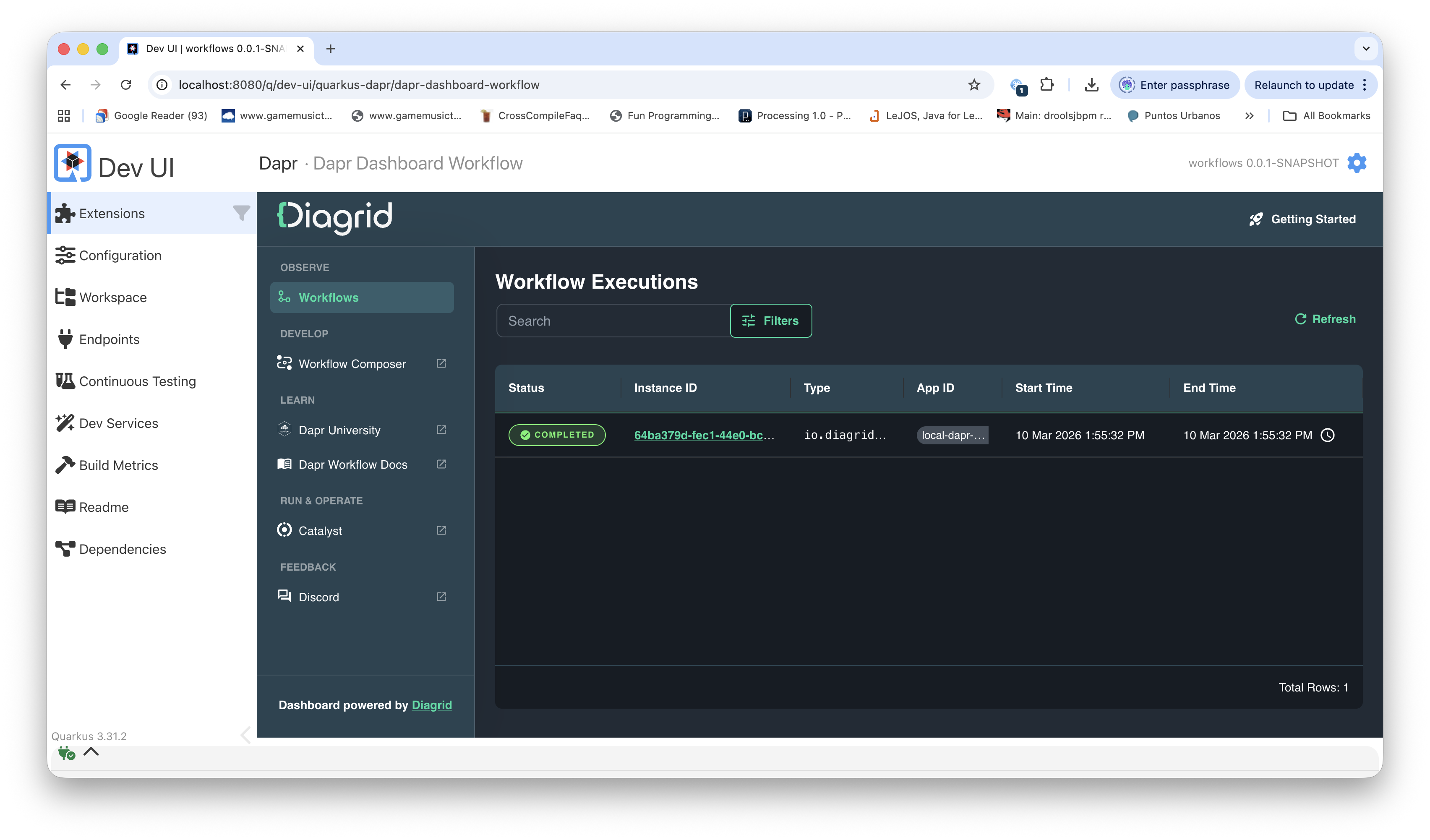
Once you are starting workflow instances, you can access the Diagrid Dev Dashboard to monitor your workflow executions.
The Diagrid Dev Dashboard is automatically set up by Testcontainers using Quarkus Dev Services.
To access the dashboard, you need to look at the logs to find the URL:
2026-03-10 13:42:19,009 INFO  [io.quarkus.grpc.runtime.GrpcServerRecorder] (vert.x-eventloop-thread-0) Started gRPC server on 0.0.0.0:9000 [TLS enabled: false]
2026-03-10 13:42:19,087 INFO  [io.quarkus] (Quarkus Main Thread) workflows 0.0.1-SNAPSHOT on JVM (powered by Quarkus 3.31.2) started in 65.698s. Listening on: http://localhost:8080
Use the Quarkus Dev UI by pointing your browser to: http://localhost:8080
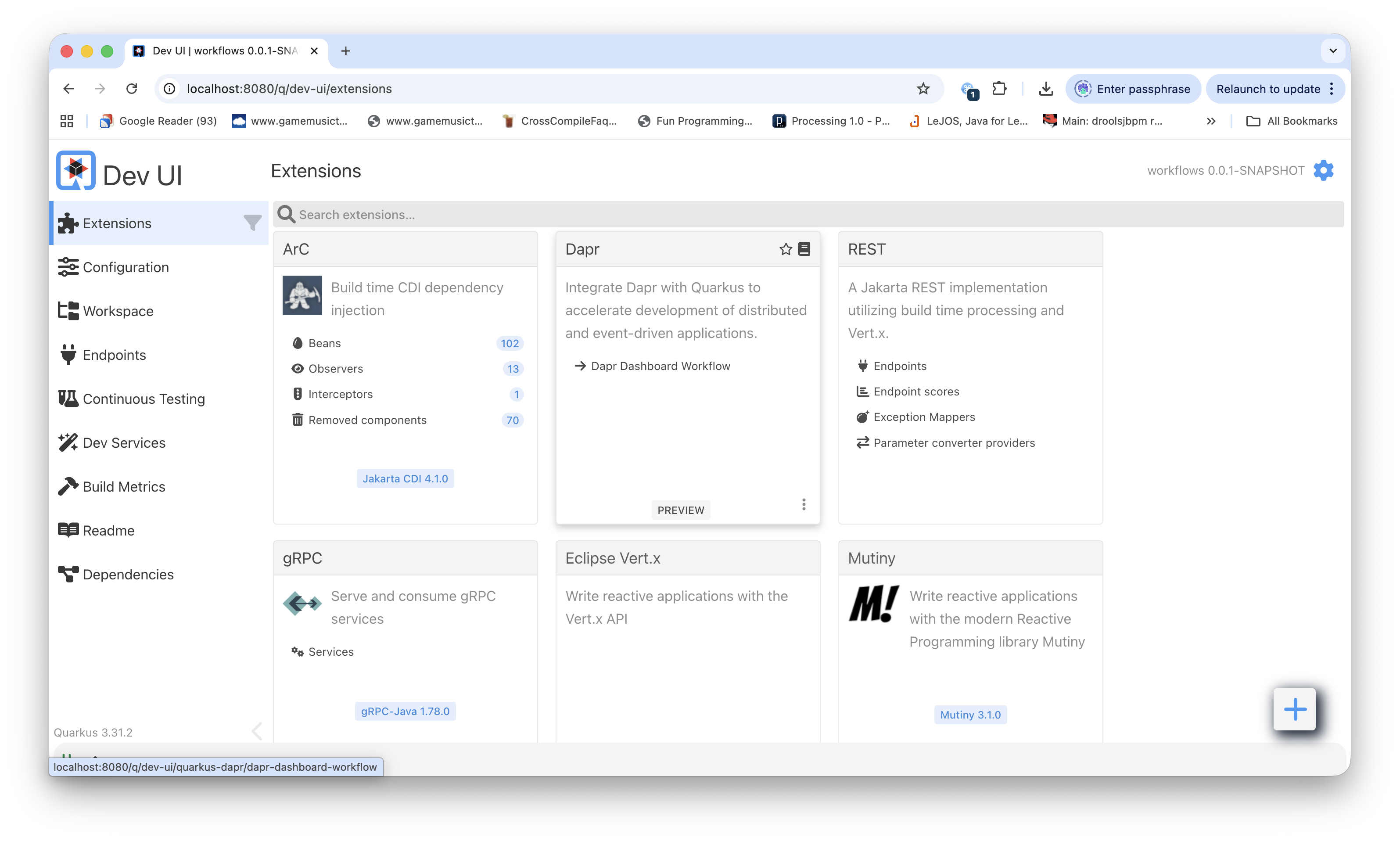
Then click on the Dapr Dashboard Workflow link inside the Dapr block.
11. Run with Diagrid Catalyst
Once you have written your workflows and tested them locally, you can run with the Diagrid Catalyst SaaS service in the cloud.
To do this, download the Diagrid CLI and use it in conjunction with Maven to start your application.
Once you have the diagrid cli you will need to login to your Diagrid account by running the following command:
diagrid login
If you don't have an account, you can create one here.
To run the application locally against Catalyst, use the diagrid dev run command in conjunction with mvn quarkus:run.
This will start the Quarkus application and connect to the Catalyst Workflow Engine to run your workflows.
diagrid dev run --project quarkus --app-id workflows --app-port 8080 -- mvn package quarkus:run
The first part of the command will create the quarkus project in Catalyst along with the workflows app-id.
Once this is done, Maven will take care of starting your Quarkus application.
diagrid dev run --project quarkus --app-id workflows --app-port 8080 -- mvn package quarkus:run
Using existing project: quarkus...

🚗 Provisioning remote dapr sidecars
Using existing dapr app id workflows... ✅

Diagrid managed workflow already enabled... ✅
Using existing Diagrid Managed Pubsub: pubsub... ✅
Using existing Diagrid Managed KV Store: kvstore... ✅

🔧 Setting default project: quarkus
💻 View your project in the web console: https://catalyst.diagrid.io/

🔍 Checking project readiness: quarkus... ✅ ready
🔍 Checking App IDs readiness... ✅ ready

🚀 Launching dev session
----------------------------------------------------------------
💡 Starting applications...
⚡️ Establishing app id connectivity...
Starting app workflows... ✅
✅ Connected App ID "workflows" to http://localhost:8080 ⚡️
== APP - workflows == [INFO] Scanning for projects...
== APP - workflows == [INFO]
== APP - workflows == [INFO] ------------------------< io.diagrid:workflows >------------------------
== APP - workflows == [INFO] Building Quarkus Dapr Workflow Onboarding 0.0.1-SNAPSHOT
== APP - workflows == [INFO]   from pom.xml
== APP - workflows == [INFO] --------------------------------[ jar ]---------------------------------
== APP - workflows == [WARNING] The artifact io.quarkus:quarkus-junit5:jar:3.31.2 has been relocated to io.quarkus:quarkus-junit:jar:3.31.2: Update the artifactId in your project build file. Refer to https://github.com/quarkusio/quarkus/wiki/Migration-Guide-3.31 for more information.
== APP - workflows == [INFO]
== APP - workflows == [INFO] --- resources:3.3.1:resources (default-resources) @ workflows ---
== APP - workflows == [INFO] Copying 1 resource from src/main/resources to target/classes
== APP - workflows == [INFO]
== APP - workflows == [INFO] --- compiler:3.13.0:compile (default-compile) @ workflows ---
== APP - workflows == [INFO] Nothing to compile - all classes are up to date.
== APP - workflows == [INFO]
== APP - workflows == [INFO] --- resources:3.3.1:testResources (default-testResources) @ workflows ---
== APP - workflows == [INFO] skip non existing resourceDirectory /Users/salaboy/code/diagridlabs/dapr-workflow-quarkus-onboarding/src/test/resources
== APP - workflows == [INFO]
== APP - workflows == [INFO] --- compiler:3.13.0:testCompile (default-testCompile) @ workflows ---
== APP - workflows == [INFO] Nothing to compile - all classes are up to date.
== APP - workflows == [INFO]
== APP - workflows == [INFO] --- surefire:3.5.2:test (default-test) @ workflows ---
== APP - workflows == [INFO]
== APP - workflows == [INFO] --- jar:3.3.0:jar (default-jar) @ workflows ---
== APP - workflows == [INFO]
== APP - workflows == [INFO] --- quarkus:3.31.2:build (default) @ workflows ---
== APP - workflows == [WARNING] The Maven extensions for the Quarkus Maven plugin are not enabled for this build. We recommend enabling this, so that the plugin can verify essential build settings have been configured as required. Please enable by adding "<extensions>true</extensions>" in your quarkus-maven-plugin declaration; it should look like:
== APP - workflows ==
== APP - workflows == 	<plugin>
== APP - workflows == 		<groupId>${quarkus.platform.group-id}</groupId>
== APP - workflows == 		<artifactId>quarkus-maven-plugin</artifactId>
== APP - workflows == 		<version>${quarkus.platform.version}</version>
== APP - workflows == 		<extensions>true</extensions> <!-- THIS ONE -->
== APP - workflows == 		...
== APP - workflows ==
== APP - workflows == [INFO] [io.quarkus.deployment.QuarkusAugmentor] Quarkus augmentation completed in 1342ms
== APP - workflows == [INFO]
== APP - workflows == [INFO] --- quarkus:3.31.2:run (default-cli) @ workflows ---
== APP - workflows == [INFO] [io.quarkus.deployment.QuarkusAugmentor] Quarkus augmentation completed in 503ms
== APP - workflows == [INFO] Executing "/Users/salaboy/.sdkman/candidates/java/21.0.5-tem/bin/java -Dquarkus.platform.version=3.31.2 -Dquarkus.application.version=0.0.1-SNAPSHOT -Dquarkus.application.name=workflows -jar /Users/salaboy/code/diagridlabs/dapr-workflow-quarkus-onboarding/target/quarkus-app/quarkus-run.jar"
== APP - workflows == __  ____  __  _____   ___  __ ____  ______
== APP - workflows ==  --/ __ \/ / / / _ | / _ \/ //_/ / / / __/
== APP - workflows ==  -/ /_/ / /_/ / __ |/ , _/ ,< / /_/ /\ \
== APP - workflows == --\___\_\____/_/ |_/_/|_/_/|_|\____/___/
== APP - workflows == 2026-02-13 09:43:08,104 INFO  [io.dapr.workflows.runtime.WorkflowRuntimeBuilder] (main) Registered Workflow: io.diagrid.workflows.SimpleWorkflow
== APP - workflows == 2026-02-13 09:43:08,105 INFO  [io.dapr.workflows.runtime.WorkflowRuntimeBuilder] (main) Registered Activity: io.diagrid.workflows.activities.FirstActivity
== APP - workflows == 2026-02-13 09:43:08,244 INFO  [io.dapr.workflows.runtime.WorkflowRuntimeBuilder] (main) List of registered workflows: [io.diagrid.workflows.SimpleWorkflow]
== APP - workflows == 2026-02-13 09:43:08,244 INFO  [io.dapr.workflows.runtime.WorkflowRuntimeBuilder] (main) List of registered activities: [io.diagrid.workflows.activities.FirstActivity]
== APP - workflows == 2026-02-13 09:43:08,244 INFO  [io.dapr.workflows.runtime.WorkflowRuntimeBuilder] (main) Successfully built dapr workflow runtime
== APP - workflows == 2026-02-13 09:43:08,245 INFO  [io.dapr.durabletask] (Thread-3) Durable Task worker is connecting to sidecar at grpc-prj571896.cloud.r1.diagrid.io:443.
== APP - workflows == 2026-02-13 09:43:08,382 INFO  [io.quarkus] (main) workflows 0.0.1-SNAPSHOT on JVM (powered by Quarkus 3.31.2) started in 0.794s. Listening on: http://0.0.0.0:8080
== APP - workflows == 2026-02-13 09:43:08,382 INFO  [io.quarkus] (main) Profile prod activated.
== APP - workflows == 2026-02-13 09:43:08,382 INFO  [io.quarkus] (main) Installed features: [cdi, dapr, grpc-client, rest, rest-jackson, smallrye-context-propagation, vertx]
You can check, manage and troubleshoot your workflow executions using the Diagrid Catalyst workflow visualizer.
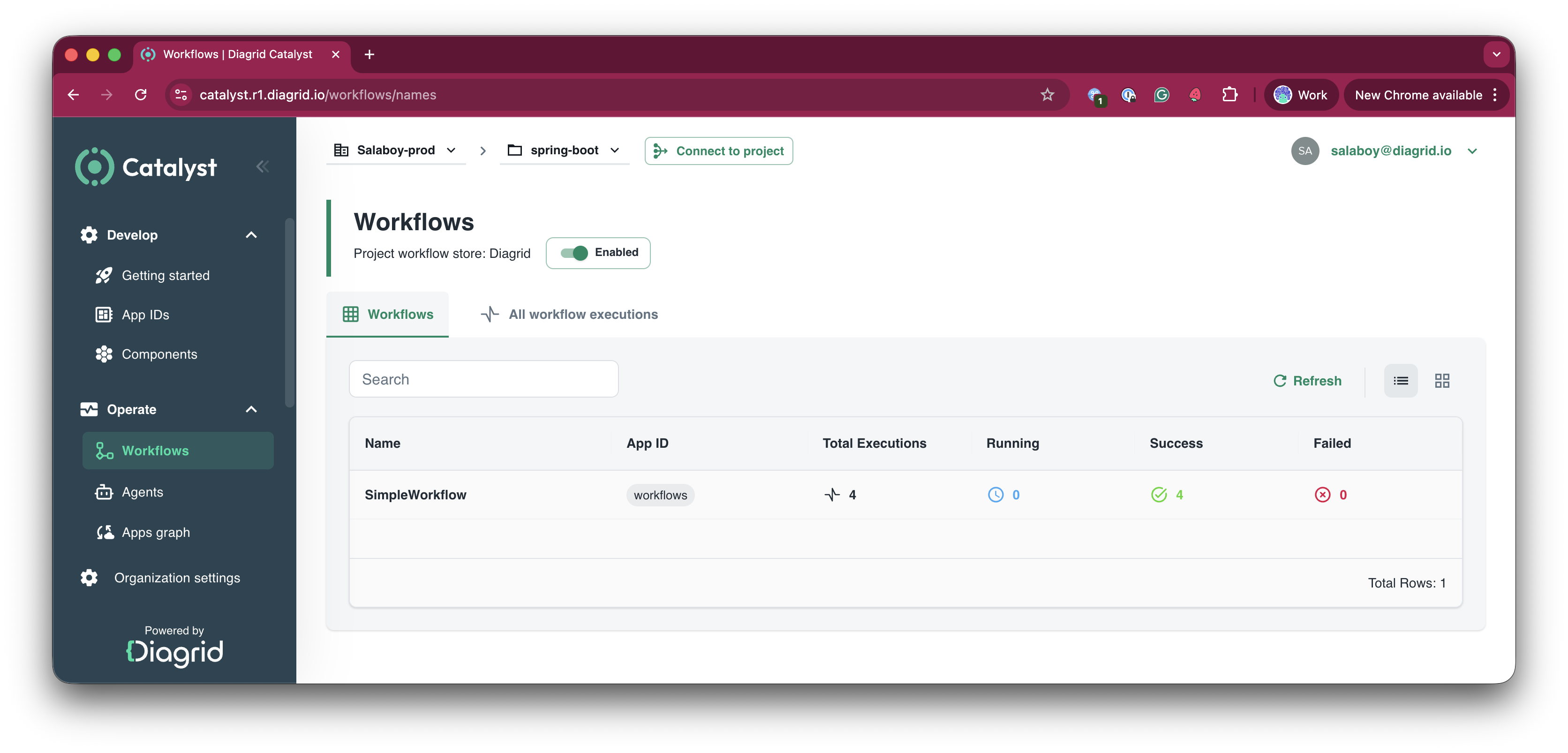
But you can drill down and inspect every execution, where you can leverage the workflow visualizer:
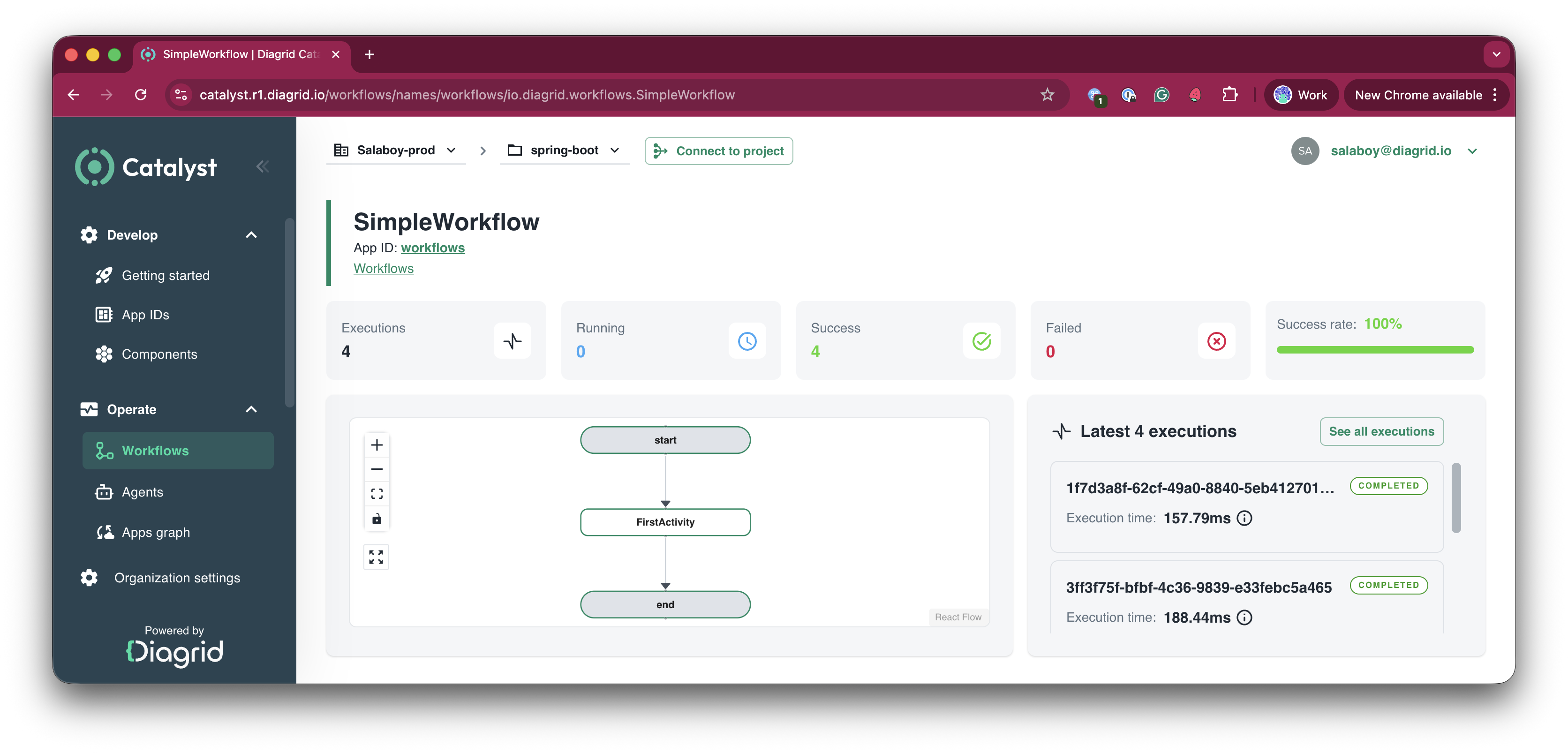
Congratulations, you just run your first cloud workflows with Diagrid's Catalyst! 🥳
Summary
In this tutorial you:
- Created a Quarkus application with Dapr Workflow support using the Quarkus Dapr extension
- Defined a workflow and activity using CDI managed beans with
@ApplicationScoped - Added JAX-RS endpoints to start and monitor workflow instances
- Ran the application locally using Quarkus Dev Services
- Connected to Diagrid Catalyst to run workflows using the managed workflow engine in the cloud
- Used the Catalyst workflow visualizer to inspect workflow executions
Resources & Links
Here is a list of resources with more information about Dapr & Dapr Workflows.